Disclosure: I may earn a commission if you buy through links on this page, at no extra cost to you. This review is based on the vendor’s sales page, the demo, the product documentation and the launch details. I’m telling you that upfront so you know how to weigh my opinions.
Present 3D is a cloud-based tool from Dr. Amit Pareek and Atul Pareek that turns a prompt, a website URL or a PDF into an interactive 3D presentation. An AI avatar presents the slides, viewers can ask questions mid-presentation, and the tool captures leads into a built-in CRM. The launch goes live on November 27, 2026, and the cart closes on December 2.
If you’re searching for a Present 3D review, you probably want to know three things: what it actually does, what it costs, and whether it’s worth buying. I’ll cover all three, including the parts that might not suit you.
What Is Present 3D?
Present 3D is a web app that builds presentations that talk and respond. Instead of exporting a slide deck and presenting it yourself, you create a presentation that plays on its own. An AI avatar speaks the content, and viewers can interrupt with questions. The AI answers by voice and text.

Get Access Present 3D Bundle Deal Today

The creators call it an “AI Presentation Agent.” Strip away the label and it’s a presentation builder, an avatar narrator, a chatbot and a small CRM in one login.
It’s sold on JVZoo as a one-time purchase rather than a monthly subscription. The vendors, Amit and Atul Pareek, are long-time JVZoo sellers, and their JV page lists them among the top sellers of 2025 on the platform. That says nothing about this specific product’s quality, but it does mean support and updates come from an established team rather than a one-off launch.
How Present 3D Works
The workflow is three steps.
Step 1: Create
You start from a text prompt, a website URL or an existing PDF. Present 3D generates the slides, writes the content and creates images for each slide. The URL option is useful if you want to turn a sales page or a service page into a presentation without rewriting anything.
Step 2: Customize
You pick an avatar from a library of 2,000+ moving AI presenters, or clone yourself. You choose a voice from 1,500+ options, or clone your own. A drag-and-drop editor lets you change text, images, layouts and branding. You can also set subtitles, auto-advance or manual navigation, and add lead forms or feedback forms.
Step 3: Share
You share the finished presentation through a link, an embed code or a QR code. Viewers can watch it, ask questions through the built-in chat and fill in forms. Everything they do ends up in the dashboard.
Present 3D Features
Here are the features that matter, grouped by what they do for you.
Presentation Creation
- Generate presentations from a prompt, a URL or a PDF
- AI-written slides and auto-generated images for every slide
- Drag-and-drop live editor with branding controls
- Super Presentations, which combine several presentations into one multi-part experience
- Export of summary reports
Avatars and Voices
- 2,000+ ready-made moving avatars
- 1,500+ natural-sounding voices
- Option to clone yourself as an avatar
- Support for 80+ languages, according to the sales page
Interaction and Lead Capture
- Built-in AI chat that answers viewer questions with voice and text
- Live chat with handover to a human
- Lead capture forms, feedback forms and thank-you messages
- Built-in CRM to store and track leads
- Basic engagement analytics
Delivery and Access
- 100% cloud-based, with nothing to install and hosting included
- Works on desktop, tablet and mobile
- Share by link, embed or QR code
- Step-by-step video training
- 24×5 customer support
The front-end version also includes a commercial license, so you can create presentations for clients.
Present 3D Pricing
The front-end price is $37, one time. There is no monthly fee. The sales page shows a crossed-out “$197 monthly” figure, but treat that as marketing and judge the $37 on its own merits.
During the launch, the coupon BLACK10 takes $10 off the front-end offer on JVZoo.
On the “lifetime” claim: the vendor defines it plainly on the sales page. Lifetime means the lifetime of the product, which they estimate at around five years of support. That’s more honest than most launches, but it’s worth knowing before you buy.
Upgrades You’ll See After Checkout
The funnel includes several optional upgrades. I’m not linking them here, but you should know they exist so the checkout doesn’t surprise you.
- Unlimited ($77): removes usage caps on workspaces, presentations, avatars, voices, images, chats and views, and raises lead capture
- Enterprise ($97): custom agent goals, smart engagement rules, appointment booking, autoresponder integrations and advanced analytics
- Automation ($97): a fuller CRM with lead scoring, follow-ups and automations
- Agency ($97): white-label license and client accounts
- Done For You ($147): the team builds and launches an agent for you
- Bundle ($497): the front end plus the first four upgrades
The front end is a working product by itself. The upgrades matter mostly if you plan to run this at volume or sell it as a service.
Pros and Cons of Present 3D
What I Like
- It goes beyond slides. Narration, Q&A and lead capture in one place means you don’t stitch together three tools.
- Starting from a URL or PDF saves real time if you already have content.
- The price is low for a tool with a commercial license included.
- No design skills are needed, and the training is included.
- One-time payment means no recurring bill.
- The vendor is upfront about what “lifetime” means.
What You Should Think About
- The front end has usage limits. The upgrades list “unlimited” for things like presentations, avatars and chats, which tells you the base version is capped. Check the exact limits on the sales page before relying on it for heavy use.
- Quality depends on the AI. Avatar realism, voice quality and answer accuracy vary by content, so test with your own material during the refund window.
- It’s a new product. There are no long-term independent user reviews yet.
- Lifetime means roughly five years of support, not forever.
- The 3D format suits some audiences better than others. A formal investor pitch may still work better as a normal deck.
Who Is Present 3D For?
It’s a good fit if you are:
- A coach, consultant or course creator who wants a presentation that explains your offer without you repeating it on every call
- A freelancer or small agency looking for a new service to offer, since the commercial license lets you build presentations for clients
- A local business owner who wants a talking presentation on a website or on a QR code at a counter or event
- A marketer who already has pages and PDFs and wants to turn them into something interactive
It’s probably not for you if you:
- Only need an occasional plain slide deck for internal meetings
- Want a tool with years of independent reviews behind it
- Need guaranteed unlimited usage on the cheapest tier
Present 3D vs. Making Slides With ChatGPT, Claude or Gemini
You can have a general AI chat tool write or even build a slide deck, and that’s fine for plain slides. The difference is what happens after.
According to the vendor’s comparison, chat tools don’t give you a talking avatar, voice cloning, a hosted viewer link, a live chat with human handover, lead forms or a CRM. Present 3D bundles those. If all you need is a quick deck to present yourself, a chat tool is enough. If you want a presentation that works on its own and collects leads, that’s where Present 3D makes sense.
Is There a Refund Policy?
Yes. Present 3D has a 30-day money-back guarantee. You raise a ticket on the support desk within 30 days and they refund the purchase. That makes it low-risk to test with your own content, which I’d recommend doing in the first week.
Present 3D Review: Final Verdict
Present 3D is a sensible buy at $37 if you want presentations that talk, answer questions and capture leads, and you don’t want to piece that together from separate tools. The commercial license makes it more interesting for freelancers and small agencies.
The caveats are real. The base version has limits, the product is brand new, and “lifetime” means about five years of support. Test it hard inside the 30-day guarantee window and judge the avatar and voice quality yourself.
If it fits what you do, you can get it through my link in this article with my exclusive bonus. Use coupon BLACK10 for $10 off during launch. The cart closes December 2.
Get Access Present 3D Early Bird Today
Use Coupon Code: BLACK10

Get Access Present 3D Bundle Deal Today
Use Coupon Code: BLACKFRIDAY
THESE ARE DRAMASTUDIOAI BONUSES WHEN YOU BUY IT VIA MY LINK TODAY
BONUS #1: Client-Getter Blueprint: Land Your First $500 Client in 7 Days
A simple day-by-day action plan that shows you exactly who to approach, what to say and how to deliver your first Present 3D project. Follow the steps and turn your first 3D presentation into your first paycheck, fast.
BONUS #2: 1,000+ Plug-and-Play AI Keyword & Prompt Vault
Never stare at a blank screen again. Copy-paste proven keywords and prompts that generate stunning 3D presentations for sales, pitches, training and product launches in under 60 seconds.
BONUS #3: Cold Outreach Scripts, Emails & DM Templates
30 high-converting messages for email, WhatsApp, LinkedIn and Instagram that get business owners to reply. Just fill in the name, send, and book your discovery calls.
BONUS #4: Pricing & Proposal Kit: Charge $500 to $5,000 Per Project
Ready-made price packages, proposal templates and upsell menus so you never undersell your work. Quote with confidence and close bigger deals from day one.
BONUS #5: 50 Hot Niches That Pay: The Niche Profit Playbook
A hand-picked list of 50 industries (real estate, dentists, gyms, coaches, restaurants and more) that need 3D presentations right now. Includes the pain points, the pitch angle and the best price for each niche.
BONUS #6: Done-For-You Agency Pitch Deck (Fully Editable)
Show clients exactly why they need a talking 3D presentation using a professional pitch deck that is already written and designed. Add your name and logo, then present it on your next sales call.
BONUS #7: Website-to-3D Money Method
Step-by-step training on turning any business website into a talking 3D presentation as a free sample. Prospects see their own brand come alive and are far more likely to say yes on the spot.
BONUS #8: Client Onboarding Pack: Contracts, Invoices & Questionnaires
Look like a seasoned agency from the very first project. Get customizable contracts, invoice templates and a client questionnaire that keeps every job smooth, professional and paid on time.
BONUS #9: Freelance Marketplace Domination Kit (Fiverr, Upwork & More)
Gig titles, descriptions, thumbnails and proposal templates built to rank and sell 3D presentation services. Start receiving orders from global buyers without paying for a single ad.
BONUS #10: LinkedIn Lead-Magnet Machine
A ready profile makeover, 30 days of post ideas and a simple content system that attracts business owners to you daily. Let leads come to you while you focus on delivering projects.
BONUS #11: Multilingual Profit Guide: Sell in Any Language, Any Country
Learn how to use the multilingual talking avatars to serve clients in Hindi, English, Spanish, Arabic and more. Tap into international markets and charge premium rates for localized presentations.
BONUS #12: Demo Vault: 20 Done-For-You 3D Presentation Samples
A library of sample presentations and demo scripts across popular niches that you can show prospects right away. Spend less time creating proof and more time closing deals.
BONUS #13: Recurring Income Playbook: Monthly Retainers & Upsells
Turn one-time projects into predictable monthly income. Discover easy upsells such as presentation updates, new languages and CRM management that keep clients paying you every month.
BONUS #14: Coach & Consultant Funnel Kit
Show coaches, trainers and consultants how a talking 3D presentation can run their webinars, sales pages and lead follow-ups for them. Includes scripts and an offer template to sell them a complete package.
BONUS #15: VIP Mastermind Access + Monthly Live Q&A
Join a private community of Present 3D users to share wins, get feedback on your offers and ask questions directly. Get live training and support so you are never stuck on your journey.





♨️ Important Update For Getting My Bonuses ♨️
You need to choose Tony Dong (253075) as your Referrer.
- If you see Tony Dong as your “New Referrer”, click the Green “Approve Change” button.
- If you see Tony Dong as your “Previous Referrer“, click the Grey “Deny Change” button.
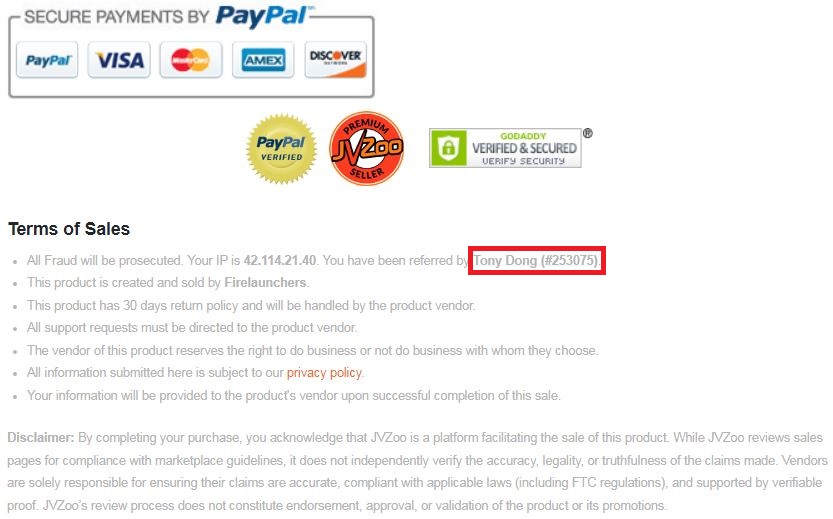
It’s very important to confirm that my affiliate ID is 253075.
Almost bonuses, I will add them to the purchase portal when you finish your transaction through my ID. If you don’t see it, please follow the instructions below
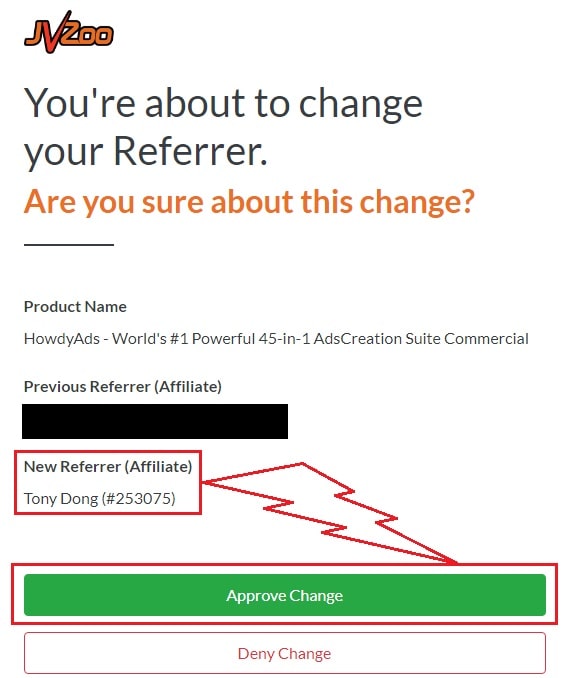
Confirm On The Checkout Page With My ID
☞ STEPS TO GET YOUR BONUSES☜
Please follow all the Important Steps Below to Claim All These Bonuses
(EXTRA BONUS + BONUS PACKAGE 1&2&3&4 + SPECIAL BONUS)
- Step#1: Press (Ctrl+Shift+Delete) or Clean/Delete the Cookies and cache of your web browser. (Please Clear It Before clicking on the Buy Button on the Sale page)
- Step#2: Get Present 3D via any link in this article: Present 3D Review or Click here
- Step#3: Confirm my ID is Tony Dong: 253075 on the checkout page, and after completing the transaction, Send Me Your ID Transaction for Verification Through My Support Email at support@reviewproductbonus.com and marketingwithtony@gmail.com
- Step#4: Use the subject line “CLAIM BONUS PRESENT3D” in your email and wait
You will receive these Bonuses within the NEXT 20 hours.
Present 3D FAQ
What is Present 3D?
Present 3D is a cloud-based tool that creates interactive 3D presentations from a prompt, a website URL or a PDF. An AI avatar presents the slides, answers viewer questions and captures leads into a built-in CRM.
How much does Present 3D cost?
The front-end version is $37 as a one-time payment, with no monthly fees. Optional upgrades are available at checkout. The coupon BLACK10 gives $10 off during launch.
Is Present 3D a subscription?
No. The front end is a one-time payment.
Can I use Present 3D for clients?
Yes. The front end includes a commercial license, so you can create presentations for clients. A white-label agency license is a separate upgrade.
Does Present 3D need any technical skills?
No. It’s cloud-based, with a drag-and-drop editor and video training included. You don’t need coding or design experience.
Which languages does Present 3D support?
The sales page says it supports 80+ languages for presentations and conversations.
Can I use my own voice or face?
Yes. You can clone yourself as an avatar and clone your own voice, or pick from the built-in avatars and voices.
Does Present 3D have a money-back guarantee?
Yes, a 30-day money-back guarantee. Contact the support desk within 30 days to request a refund.
What does “lifetime access” mean for Present 3D?
The vendor says lifetime refers to the lifetime of the product, which they estimate at around five years of support and updates.
Thank you for reading my Present 3D Review
Wish You Success and See You Again