Most of us use ChatGPT or Claude the same way. We ask a question, get a good answer, and then do the actual work somewhere else. The script comes from one tab, the voiceover from another, the graphics from a third, and the scheduling from a fourth.
SuperPlug AI, created by Pankaj Malav and Deepanker Rajora, is built to remove that step. This SuperPlug AI review covers what the tool does, how it works, what each price tier gets you, and where you should be careful before you buy.
Quick disclosure: this page contains affiliate links. If you buy through them, I earn a commission at no extra cost to you. The details below come from the official demo, the sales funnel and the launch documentation, and I’ve kept the limits in the picture along with the good parts.

Get Access SuperPlug AI Bundle Deal Today

SuperPlug AI Review: The Short Version
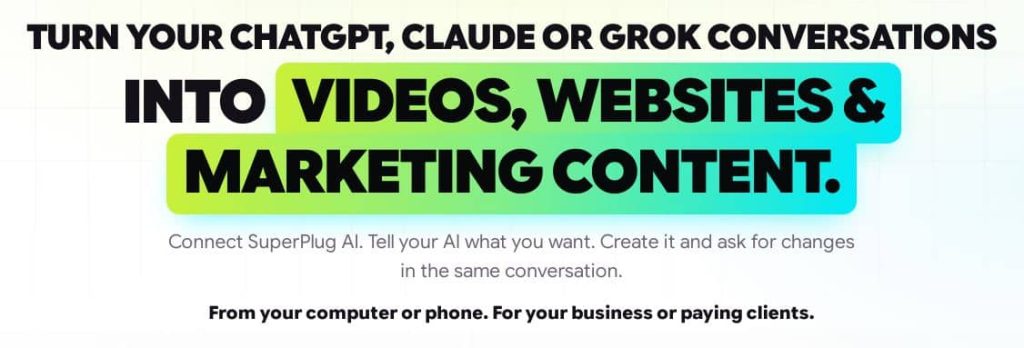
SuperPlug AI is a plug-in for the AI chat you already use. You paste one personal link into ChatGPT, Claude or Grok, sign in once, and that chat can then produce finished videos, websites, graphics, voiceovers, music and social posts instead of only describing how to make them.
It’s a one-time payment during the launch window, which runs from November 4 to November 10, 2026. The front-end plan is $47. Upgrades are optional.
My take: it’s a good fit for freelancers, small agency owners, affiliates and local business owners who already live inside an AI chat. It’s a poor fit if you want a standalone app with its own editor and timeline.
What Is SuperPlug AI?
SuperPlug AI is a production engine that connects to AI assistants through MCP, the open standard that lets tools like ChatGPT and Claude talk to outside software. The vendor says it’s the first production studio built on that standard.
Here’s the idea in practice. Say you run a café and want a reel for your opening day. You drop your menu, a few photos and the address into the chat and type something like: “Make a reel for our opening. Start with the cinnamon rolls coming out of the oven. Put our address at the end.”
Your AI plans the job and shows you the steps, the time and the credit cost. You approve it, SuperPlug makes the video, and the file lands in your project library. If you want a change, you ask for it in the same chat.
The product is aimed at three frustrations the sales material calls out:
- AI chats give you answers, not finished work.
- You end up as the copy-and-paste link between ChatGPT and half a dozen other tools.
- Most AI tools spend your credits without showing you the cost first.
How SuperPlug AI Works
The setup is short, and there’s nothing to install.
Step 1: Plug In
Copy your personal SuperPlug link, paste it into ChatGPT, Claude or Grok, and sign in once. The vendor puts this at about two minutes, and it reportedly works on Claude’s free plan. If you’d rather skip outside AI accounts entirely, a built-in SuperPlug Chat is included.
Step 2: Ask
Type what you need in plain language, or pick one of the ready-made workflows. You can attach a photo, a file or a link. There’s no prompt engineering to learn.
Step 3: Approve
Before anything is made, your AI shows the plan, the time and the credit cost. You say yes, and the work gets produced. You can also set a daily credit cap and an “ask me first” limit, and nothing gets published, sent or spent without your approval.
Step 4: Publish and Use It
Publish the site, schedule the posts or hand the files to a client. A commercial license is included, and the creators say they take no commission on client work.
What You Can Make With SuperPlug AI
The feature list is long, so here are the parts that stand out.
Video and Film
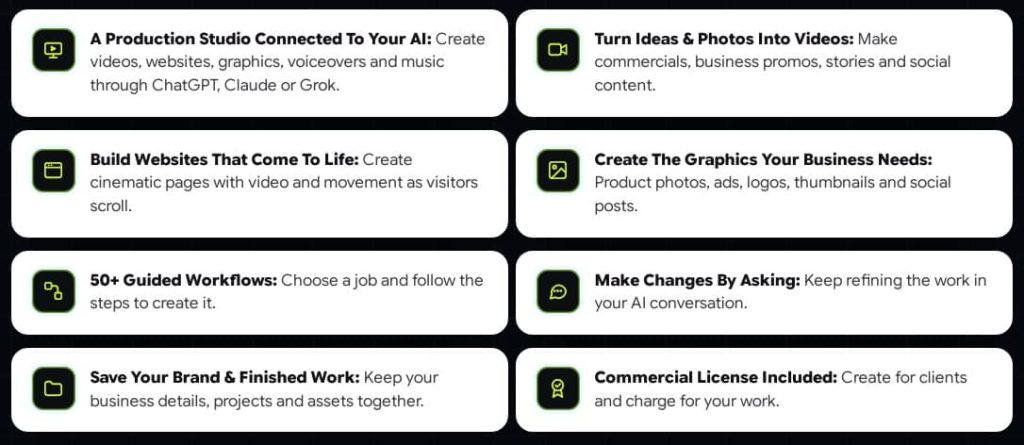
One product photo can become a 30-second commercial shot across five locations, with the same product label in every frame. You can also make UGC-style videos, explainers, VSLs, unboxings and testimonial montages, turn a selfie into a lip-synced talking intro, or build a faceless YouTube channel with scripts, voiceovers, Shorts and thumbnails. There’s also a tool that cuts one long video into captioned Shorts.
H3: Websites
It can build restaurant, salon, coach, property and agency sites, including scroll-animated and 3D-style pages. A makeover feature takes an existing business site and rebuilds it in a more modern style using the original copy and images. Published sites come with a working enquiry form, and leads land in your account.
Graphics and Design
This covers logos, thumbnails, banners, posters, menus and full brand kits. There’s a product photo tool that produces studio shots, lifestyle scenes and white-background images for marketplaces, plus print-ready files with bleed and crop marks.
Voice and Music
You get voiceovers in 20 spoken languages and original music for videos, so there are no licensing worries.
Content, Email and Lead Tools
The content side plans and schedules a week of Facebook and Instagram posts, builds a 30-day calendar, and turns blog posts into video and social posts. A Lead Finder returns lists like “20 dentists in Austin” at zero credits, and the outreach tools help you build a sample and pitch each lead. Email sequences can be written for you too, though loading them straight into your email tool needs the Max upgrade.
SuperPlug AI Pricing and Funnel Breakdown
Here is the full funnel as listed in the launch documents. Every plan is a one-time payment.
Front End: SuperPlug AI Premium ($47)
This is the core product. It includes:
- The SuperPlug MCP engine and connections to ChatGPT, Claude or Grok
- 50+ ready-made production workflows
- 2,500 creation credits per month
- 500 MCP connections per month, up to 5 at the same time
- 10GB cloud storage and 3 saved brand kits
- 1 user, watermark-free exports and a commercial license
- Training and a 14-day money-back guarantee
There’s an optional $27 order bump at checkout. Use the coupon code SUPERPLUG for 10% off the front-end plan.
OTO 1: SuperPlug AI Pro Unlimited ($67)
Adds 2,500 extra credits, 200+ Pro workflows, unlimited monthly MCP connections, 50GB storage, unlimited brand kits, batches of 20 jobs, a custom workflow builder and multi-language video campaigns.
OTO 2: SuperPlug AI Max ($67)
Connects your wider toolset to the chat: email platforms like GetResponse, Mailchimp and Brevo, Notion, Airtable, Trello, ClickUp, Google Sheets, Slack, Telegram, and 7,000+ apps through Zapier, Make and Pabbly. It also lets you bring your own accounts for ElevenLabs, HeyGen, fal.ai, Replicate and others.
OTO 3: SuperPlug AI Agency ($67)
A client dashboard with a separate brand kit, credit budget and project library for each client, approval links, white-label client websites and an agency starter kit with a proposal deck and outreach scripts.
OTO 4: SuperPlug AI Teams ($47)
Team seats with roles, an approval queue, per-seat spending limits and an activity log. One caution: the vendor’s own notes say some of the Teams features were not shown in the demo and are still being confirmed. I’d wait for the finished feature list before buying this one.
The Bundle Deal
The bundle lists at $397 and includes every upgrade and bonus, plus 5,000 credits per month. With the coupon code SUPERPLUG100, you get $100 off, which brings it to $297. A split payment option of three payments of $147 is also available. A separate Mega Bundle order bump comes in two sizes: Pro at $247 with 10,000 one-time credits, and Lite at $147 with 5,000 one-time credits.
SuperPlug AI Pros and Cons
What I Like
- It works inside tools you already use. There’s no new dashboard to learn, and you can even start a job from the ChatGPT or Claude phone app and find it finished on your desktop.
- Plan-first control. Seeing the credit cost before any work starts is a sensible design choice, and the daily cap is a nice safety net.
- One-time pricing. In a market full of monthly subscriptions, a single payment during launch is a real draw.
- Commercial license included. You can sell the output to clients without paying a commission.
- The Lead Finder costs no credits. That’s useful if you’re building an outreach pipeline.
- A 14-day money-back guarantee lowers the risk of testing it yourself.
What You Should Watch Out For
- Credits are finite. The front-end plan gives you 2,500 credits per month. The vendor’s example puts a client website at 48 credits, which works out to roughly 50 sites, but longer videos will cost more. Heavy users will want the Pro or bundle plans.
- The best features sit in the upgrades. Email platform integrations, bring-your-own-AI, client management and scheduling all need OTOs. The front end is solid, but it isn’t the whole product.
- It depends on an outside AI chat. You’ll still need ChatGPT, Claude or Grok, or the built-in SuperPlug Chat, to drive it.
- Output quality varies with your input. Any AI production tool gives better results when you give it clean photos and a clear brief.
- Income claims need a grain of salt. The material mentions agencies charging $800 to $1,200 a month for similar work. The vendor itself notes that results vary by effort and market, and I’d treat that number as an example, not a promise.
Who Should Buy SuperPlug AI?
It’s a Good Fit For
- Freelancers and small agency owners who sell video, websites or social content to local businesses
- Affiliate marketers who need review videos, bonus pages and email sequences quickly
- Creators who want faceless YouTube or short-form content without being on camera
- Small business owners who want to stop paying for several separate tools
It’s Probably Not For
- People who want fine, frame-by-frame control in a traditional video editor
- Anyone who won’t use an AI chat tool at all
- Buyers expecting guaranteed income from a tool alone
SuperPlug AI Bonuses and Launch Contest
Buying through my link gets you the vendor’s launch bonuses, and I add my own on top. Details are on the custom bonus page.
The launch runs from Wednesday, November 4 at 11:00 AM EST to Monday, November 10 at 11:59 PM EST. Because launch pricing is the whole appeal here, it’s worth deciding before the window closes. The vendor says the product moves to monthly pricing afterward.
SuperPlug AI Review: Frequently Asked Questions
Is SuperPlug AI legit?
It’s a real product with a public demo, a sales page, a support email (support@thesuperplug.com) and a 14-day money-back guarantee on the front-end purchase. As with any launch, read the refund terms and test it within the guarantee window.
Do I need a paid ChatGPT or Claude account?
According to the vendor, no. It works on Claude’s free plan, and SuperPlug Chat is built in if you’d rather not use any outside AI account. Keep in mind that some features, like bring-your-own-AI, need the Max upgrade.
Can I use SuperPlug AI for client work?
Yes. A commercial license is included in the front-end plan, so you can sell what you create. Managing multiple clients with separate budgets and brand kits needs the Agency upgrade.
How much does SuperPlug AI cost?
The front-end plan is $47 one-time. The upgrades cost $67, $67, $67 and $47, and the full bundle is $397, or $297 with the code SUPERPLUG100.
Is there a SuperPlug AI coupon code?
Yes. Use SUPERPLUG for 10% off the front-end plan, or SUPERPLUG100 for $100 off the bundle.
What is the MCP engine?
MCP stands for Model Context Protocol, an open standard that lets AI assistants connect to outside tools. SuperPlug uses it to give your AI chat the ability to make files, not just text.
Does it have a refund policy?
The front-end plan comes with a 14-day money-back guarantee.
Final Verdict: Is SuperPlug AI Worth It?
If you already spend your day in ChatGPT or Claude and keep running into the “now go make it somewhere else” wall, SuperPlug AI is one of the more practical ideas I’ve seen this year. The plan-first approach, the one-time price and the commercial license are the strongest points.
Start with the $47 front end and see whether the workflow suits you. Add upgrades only when you hit a real limit, such as credits, client management or email integrations. And since there’s a 14-day guarantee, the cost of testing it is low.
Get Access SuperPlug AI Early Bird Today
(Use Coupon SUPERPLUG for 10% Off)


Get the SuperPlug AI Bundle Deal (Use Coupon SUPERPLUG100 for $100 Off)
THESE ARE AI AGENCY ENGINE AI BONUSES WHEN YOU BUY IT VIA MY LINK TODAY
✅ Bonus 1: AI Newsroom JupiterMeet Suite (Whitelabel | Value $485)
Host breaking news panels, expert interviews, and live virtual events with advanced tools like screen sharing, whiteboards, and HD recording. Perfect for adding real-time engagement to your AI-generated news broadcasts, making your site feel alive and authoritative.
✅ Bonus 2: AI RadioStation CastLab Pro (Whitelabel | Value $265)
Stream live audio commentary, breaking news coverage, and pre-recorded AI news reports to a global audience. Whether you’re launching a 24/7 online radio station or adding a “Listen Now” feature to your site – this bonus massively boosts reach, retention, and user interaction.
✅ Bonus 3: NewsBot AutoPoster Engine (Whitelabel | Value $495)
This powerhouse WordPress plugin pulls targeted news content, videos, and social posts straight into your site 24/7 – all hands-free. Perfect for anyone who wants a constantly updating news hub without ever lifting a finger.
✅ Bonus 4: FluxNews AI Mobile App Builder (Value $397)
Designed for AI News Avatar users, this Flutter-based solution lets you convert your WordPress-powered news site into native iOS and Android apps – lightning fast. Tap into millions of mobile users and deliver push-notification alerts for your breaking stories!
✅ Bonus 5: NewsPro AI Mobile Suite (Value $425)
Want to turn your AI-powered news site into a native mobile app instantly? With NewsPro AI Mobile Suite, you can convert any WordPress-based news site into sleek, high-performance Android and iOS apps. Fully synced with your backend and ready to deliver real-time updates, articles, videos, and AI news reports to your mobile readers worldwide
PLUS THESE EXCLUSIVE BONUSES











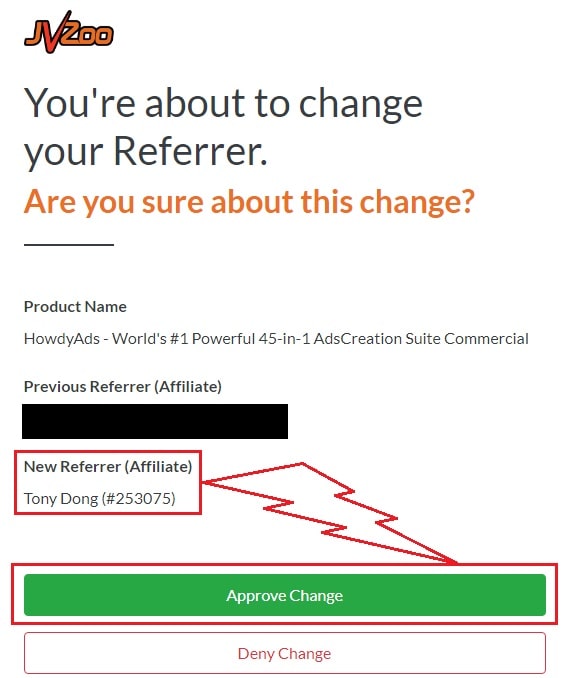
♨️ Important Update For Getting My Bonuses ♨️
You need to choose Tony Dong (253075) as your Referrer.
- If you see Tony Dong as your “New Referrer”, click the Green “Approve Change” button.
- If you see Tony Dong as your “Previous Referrer“, click the Grey “Deny Change” button.
It’s very important to confirm that my affiliate ID is 253075.
Almost bonuses, I will add them to the purchase portal when you finish your transaction through my ID. If you don’t see it, please follow the instructions below
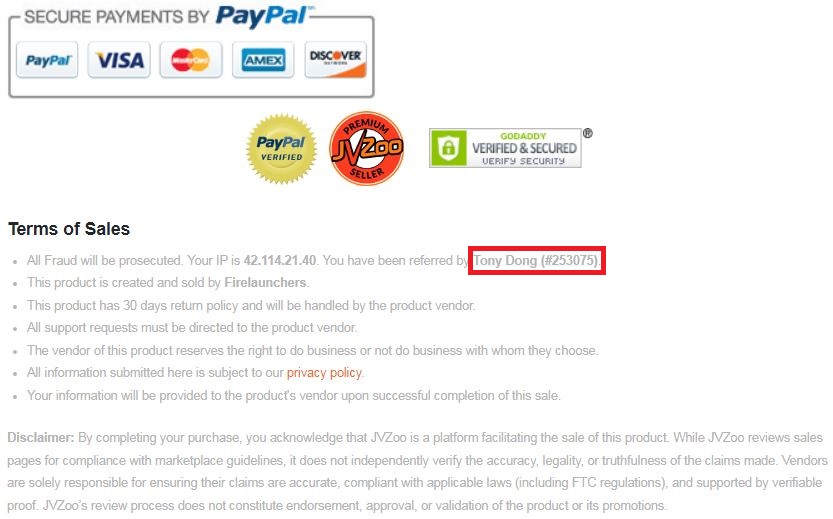
Confirm On The Checkout Page With My ID
☞ STEPS TO GET YOUR BONUSES☜
Please follow all the Important Steps Below to Claim All These Bonuses
(EXTRA BONUS + BONUS PACKAGE 1&2&3&4 + SPECIAL BONUS)
- Step#1: Press (Ctrl+Shift+Delete) or Clean/Delete the Cookies and cache of your web browser. (Please Clear It Before clicking on the Buy Button on the Sale page)
- Step#2: Get AI Agency Engine via any link in this article AI Agency Engine Review or Click here
- Step#3: Confirm my ID is Tony Dong: 253075 on the checkout page, and after completing the transaction, Send Me Your ID Transaction for Verification Through My Support Email at support@reviewproductbonus.com and marketingwithtony@gmail.com
- Step#4: Use the subject line “CLAIM BONUS AI AGENCY ENGINE” in your email and wait
You will receive these Bonuses within the NEXT 20 hours.
Thank you for reading my AI Agency Engine Review
Wish You Success and See You Again
Affiliate disclosure: I may earn a commission if you purchase through links on this page. Results vary by effort, skill and market, and nothing here is a guarantee of income.