If you’ve spent more than five minutes trying to build a lead magnet from scratch, you already know the drill. You write a rough outline in one tab, format it in Canva or Google Docs in another, wrestle with a PDF export that looks nothing like the preview, then go build an opt-in form in a third tool, and finally try to connect all of that to your email provider so the download actually gets sent. By the time you’re done, the “quick lead magnet” has eaten your entire weekend.
That’s the exact gap Tony Dong is targeting with Lead Magnet Forge, and in this review I’m going to walk through what it does, what’s inside each upgrade, where it genuinely helps, and where I’d tell you to slow down before buying.
What Is Lead Magnet Forge?
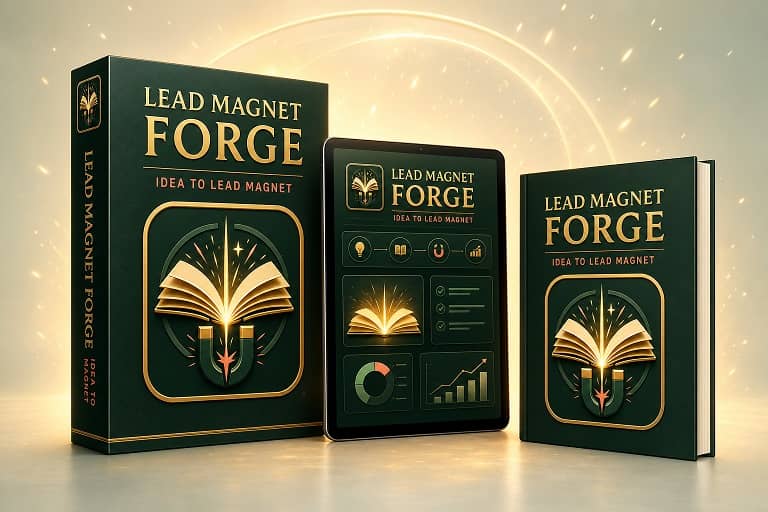
Lead Magnet Forge is an AI-powered SaaS platform built to take a simple idea and turn it into a working lead-generation asset — the ebook, the PDF design, the opt-in form, the delivery, and the follow-up emails — without switching between five different apps to get there.
Instead of writing in one place, designing in another, and manually connecting an opt-in form to your autoresponder, the whole workflow lives inside one dashboard. You type in a brief, the app drafts a structured ebook, you pick a template, publish an opt-in form, and leads start flowing into a dashboard that tracks who signed up and whether they actually received the file.

Who Is This Built For?
Based on the product itself, Lead Magnet Forge is aimed at people who need a lead magnet as part of a bigger business, not people who want to sell ebooks as a product. That includes coaches, consultants, course creators, service providers, agencies, and affiliate or funnel marketers who need something useful to trade for an email address.
How Lead Magnet Forge Works, Step by Step
The workflow follows a fairly logical order:
Step 1: Define the Brief
You tell the app what the guide should help someone achieve, who the audience is, and what tone you want (Friendly, Expert, or Casual). This is the part that determines whether the finished ebook actually sounds relevant to your niche, so it’s worth spending real time here instead of typing three words and hoping for the best.
Step 2: Generate and Edit the Ebook
The AI produces a structured five-chapter ebook based on that brief. You can review the chapter breakdown, rewrite sections, fix anything that sounds generic, and adjust the title before moving forward. This editing step matters — AI-generated first drafts are rarely publish-ready straight out of the gate, and Lead Magnet Forge doesn’t pretend otherwise. It gives you a structure to work from rather than a finished product to blindly publish.
Step 3: Apply a Design Template
Once the content is set, you choose a template that controls the cover, color palette, typography, table of contents, chapter openers, and callout sections. This is where the ebook stops looking like a Word document and starts looking like something you’d actually be comfortable putting your name on.
Step 4: Set Up the Opt-In Form
You customize the headline, button text, success message, and color of the form that will capture the lead’s email address.
Step 5: Publish
Publishing moves the ebook from Draft to Published and generates a downloadable PDF, a public opt-in form, and ready-to-paste iframe code you can drop into a website, blog, or landing page.
Step 6: Capture, Deliver, and Track
When someone fills out the form, Lead Magnet Forge logs the lead, attaches it to the correct ebook, and attempts delivery. You can see delivery status — sent, pending, failed, or synced to your ESP — inside the Leads dashboard, along with form views and opt-in rate.
Watch Lead Magnet Forge Demo
Core Features Worth Knowing About
AI-assisted ebook writing. You’re not staring at a blank page. The app generates a full five-chapter structure based on your subject, audience, and tone, and you keep editing rights over everything before it goes live.
Real design templates, not just plain text export. Cover design, chapter layout, callouts, worksheets, and a closing call-to-action page are all part of the template system, which matters if you’ve ever tried to make a plain-text AI output look like something worth downloading.
An editable ebook workspace. Published doesn’t mean locked. You can reopen an ebook later, change the design, update the form, or grab the embed code again without rebuilding the asset from zero.
Customizable lead-capture forms with embeddable code. Each ebook gets its own form, and the iframe code works on most HTML-supported platforms, so you’re not locked into one page builder.
A lead dashboard built on real data. You can search by email, filter by lead magnet, filter by delivery status, and separate personal leads from client leads if you’re doing agency work — which is a detail a lot of similar tools skip.
Automatic delivery with fallback protection. Front End users get an included Resend fallback allowance for sending the ebook. If you upgrade to OTO 1, you can route leads directly into a connected ESP with retry and recovery logic for failed deliveries.
Lead Magnet Forge Pricing: Front End and All Four OTOs
This is where you need to slow down, because the front-end price is not the full picture — and it never is with this kind of funnel.
Front End — Lead Magnet Forge — $37
Covers five personal ebook generations per month, AI-assisted five-chapter content, the three writing tones, included templates, PDF download, editable draft/published ebooks, opt-in forms, embed code, the lead dashboard, and up to 100 fallback email deliveries per month.
OTO 1 — Unlimited + Auto-ESP — $37 today, then $37/month
Removes the five-ebook monthly cap and adds direct routing into Mailchimp, GetResponse, AWeber, or Kit, plus a Lead Recovery Queue, automatic retry, and ESP health monitoring. This is the one that turns Lead Magnet Forge from “occasional tool” into an ongoing part of your delivery infrastructure, and it’s also the one with a recurring cost attached, so factor that into your decision before you click buy.
OTO 2 — DFY Templates — $37
Adds 18 premium ebook templates across different niches and styles, with full palette, font, and layout-density controls. If you plan on publishing more than one or two lead magnets, this is the upgrade that stops every asset from looking like the same template with a swapped cover.
OTO 3 — Email Sequences — $47
Generates five, six, or seven follow-up emails tied permanently to a specific lead magnet, with editable subject lines, body copy, send delays, and CTA controls. Worth noting: this does not auto-publish into your ESP. You copy the approved emails over yourself, which is a fair trade-off but one you should know about before assuming it’s fully automated.
OTO 4 — Agency License — $197
Built for freelancers and agencies. It adds separate client workspaces, client-specific ebooks and forms, a branded Client Delivery Portal, and an approval workflow — without ever having to hand clients a login to the main app.
What I Actually Like About Lead Magnet Forge
The biggest thing this app gets right is connecting the dots between content, design, form, and delivery. Most AI writing tools stop at generating text and leave you to figure out the rest. Lead Magnet Forge treats the ebook as the start of a workflow, not the finish line, and the lead dashboard using real captured data instead of vanity numbers is a small detail that says something about how it was built.
I also like that editing isn’t an afterthought. You can go back into a published ebook and change the content, design, or form later, which matters because your first draft — AI-written or not — is rarely your best version.
Where I’d Slow Down
The AI-generated first draft of any ebook is a starting point, not a finished product. If you publish it without a real edit pass, it will read like AI wrote it, and your audience will notice. Budget the time to rewrite before you publish.
The recurring $37/month on OTO 1 is easy to skip past in a launch funnel, so read that line twice before checking out. And OTO 3’s email sequences require manual copy-paste into your ESP rather than auto-publishing, which is fine, but not what some buyers will assume going in.
Who Should Buy Lead Magnet Forge
This makes sense for coaches, consultants, course creators, and service providers who need a lead magnet as part of a bigger offer, for marketers tired of stitching together five separate tools, and for agencies that want a repeatable way to build and deliver lead magnets for clients without giving them app access.
It’s a weaker fit if you only need one ebook, ever, or if you already have a writer, designer, and ESP workflow that’s working fine and you’re not looking to consolidate anything.
Final Verdict
Lead Magnet Forge isn’t selling a fantasy about AI replacing your entire content team. It’s selling a shortcut through the boring, repetitive part of building a lead magnet — the writing, the formatting, the form, and the delivery — so you can focus your time on the offer and the traffic instead of the plumbing. If you edit the AI drafts properly and go in with a clear read on what each OTO actually adds versus what’s genuinely optional, this is a reasonable pickup for anyone who builds lead magnets more than once.
Get Access Lead Magnet Forge Early Bird Discount Now

These are Lead Magnet Forge Bonuses when You Buy Through My Links in This Article Today
Bonus 1 – 50 Lead Magnet Idea Prompts (Value $37)
Fifty practical, customizable ideas across ten markets, plus a strong-idea filter that helps you choose a credible quick win.
Bonus 2 – Quick-Start Brief Workbook (Value $27)
A guided workbook for defining the audience, promise, content boundaries, voice, proof, and next offer before generating.
Bonus 3 – Embed Installation Checklist (Value $27)
A platform-neutral desktop, mobile, submission, delivery, and maintenance checklist for every opt-in form you publish.
Bonus 4 – 30-Day Lead Magnet Promotion Planner (Value $47)
A four-week promotion schedule with daily actions, weekly messaging prompts, and a simple channel metrics tracker.
Bonus 5 – Conversion Optimization Scorecard (Value $37)
A 75-point scoring system for your promise, PDF, opt-in experience, delivery workflow, traffic, and learning loop.
THAT’S NOT ALL. THESE ARE MORE BONUS










These are Bonuses for Lead Magnet Forge OTO When You Buy More OTO/Upsell
When you buy Lead Magnet Forge OTO 1, you will get more these bonuses:
Bonus 1 – ESP Quick-Connect Playbooks (Value $47)
Provider-specific connection, testing, credential-safety, and handoff workflows for Mailchimp, GetResponse, AWeber, and Kit.
Bonus 2 – Lead Delivery Automation Checklist (Value $27)
A production launch gate covering consent, Forge setup, provider automation, end-to-end testing, failure readiness, and approval.
Bonus 3 – High-Converting Thank-You Page Copy Kit (Value $37)
Four customizable confirmation patterns, inbox microcopy, immediate-download copy, and a mobile publishing review.
Bonus 4 – ESP Troubleshooting & Deliverability Guide (Value $47)
A capture-to-inbox diagnostic workflow with SPF, DKIM, DMARC essentials, credential recovery, and escalation records.
When you buy more OTO 4 – Lead Magnet Forge Agency License, you will get more these exclusive bonuses:
Bonus 4 – Proposal, Scope & Agreement Pack (Value $127)
Operational templates for proposals, intake, scope, revisions, approval, and final acceptance.
Bonus 5 – Client Onboarding & Delivery System (Value $97)
A repeatable intake-to-handoff workflow aligned with Client Workspaces and versioned Delivery Portals.
Bonus 6 – Monthly Retainer Blueprint (Value $97)
Turn real monitoring, maintenance, refresh, and reporting work into a clearly bounded recurring service.
Bonus 7 – Niche Offer Starter Packs (Value $147)
Eight adaptable campaign concepts for coaches, real estate, local business, wellness, SaaS, agencies, finance, and ecommerce.
Choose 10 Custom Special Bonuses for Lead Magnet Forge OTO

♨️ Important Update For Getting My Bonuses ♨️
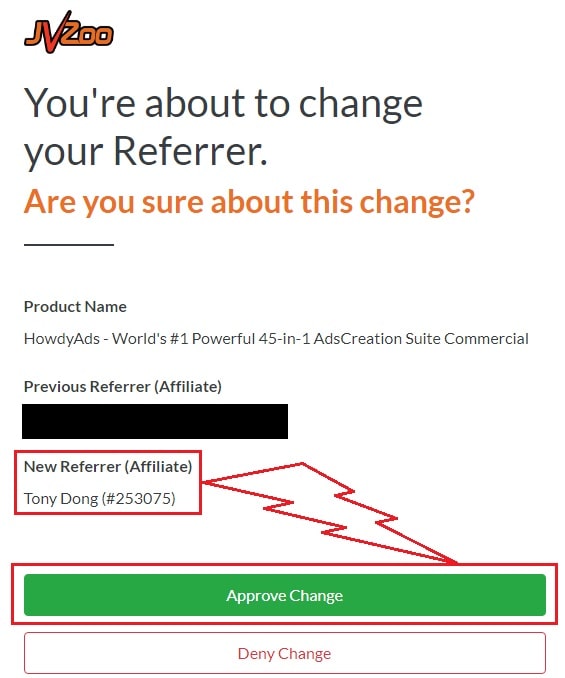
You need to choose Tony Dong (253075) as your Referrer.
- If you see Tony Dong as your “New Referrer”, click the Green “Approve Change” button.
- If you see Tony Dong as your “Previous Referrer“, click the Grey “Deny Change” button.
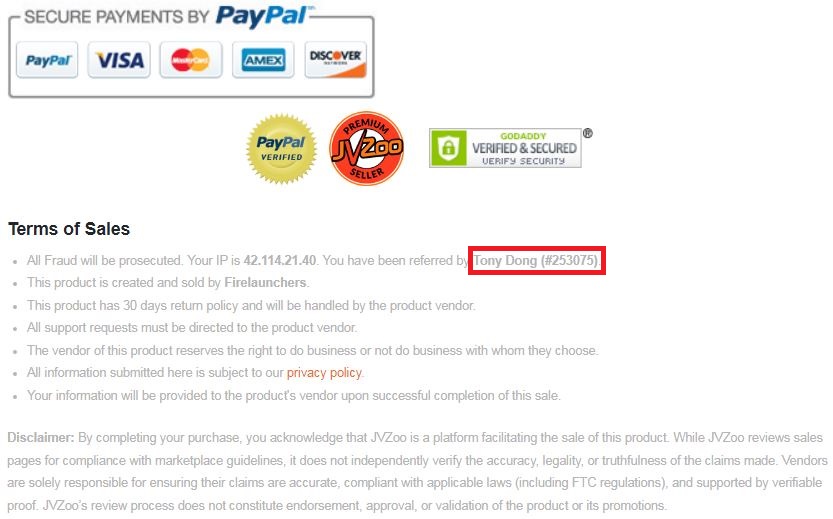
It’s very important to confirm that my affiliate ID is 253075.
Almost bonuses, I will add them to the purchase portal when you finish your transaction through my ID. If you don’t see it, please follow the instructions below
Confirm On The Checkout Page With My ID
☞ STEPS TO GET YOUR BONUSES☜
Please follow all the Important Steps Below to Claim All These Bonuses
(EXTRA BONUS + BONUS PACKAGE 1&2&3&4 + SPECIAL BONUS)
- Step#1: Press (Ctrl+Shift+Delete) or Clean/Delete the Cookies and cache of your web browser. (Please Clear It Before clicking on the Buy Button on the Sale page)
- Step#2: Get Lead Magnet Forge via any link in this article Lead Magnet Forge Review or Click here
- Step#3: Confirm my ID is Tony Dong: 253075 on the checkout page, and after completing the transaction, Send Me Your ID Transaction for Verification Through My Support Email at support@reviewproductbonus.com and marketingwithtony@gmail.com
- Step#4: Use the subject line “CLAIM BONUS LEADMAGNETFORGE” in your email and wait
You will receive these Bonuses within the NEXT 20 hours.
Thank you for reading my Lead Magnet Forge Review
Wishing You Success and See You Again
Disclosure: This review may contain an affiliate link. If you purchase through it, I may earn a commission at no extra cost to you. I only recommend tools I’ve actually looked into and believe offer real value


