If you hate filming yourself but know you should be posting video, this TwinClips AI review is for you.
TwinClips AI is a cloud-based tool from Adrian Isfan that turns one photo and a 30-second voice sample into an AI version of you. You type a script, click generate, and your “twin” delivers it as a captioned vertical video. It’s currently sold for a one-time $67 instead of a monthly fee.
I went through the full sales page, the feature list, the credit system, the pricing comparisons and the refund terms. Below is what the tool does, who it suits, where the marketing is vague, and whether the price makes sense.


What Is TwinClips AI?
TwinClips AI is a web-based AI video creator built around the idea of a personal digital avatar. You upload a clear, front-facing photo (JPG or PNG), record about 30 seconds of your voice in the browser, and the software builds a reusable twin that looks and sounds like you.
After that, every new video starts with text. You write or paste a script, pick a style, and the tool produces a 9:16 vertical video with captions, ready for TikTok, Instagram Reels or YouTube Shorts.
It’s aimed at people who need regular video content but don’t want the camera, lighting, retakes and editing that come with it. Think coaches, consultants, dentists, real estate agents, salon owners, e-commerce sellers and small agencies.
How TwinClips AI Works
The process is three steps, and it’s simpler than most video tools I’ve seen described.
Step 1: Upload your photo
You give it one clear photo. Good lighting and a natural expression matter here, because that photo is the base of every video. If you’d rather not use your own face, you can pick one of the built-in AI avatars.
Step 2: Record your voice
You speak naturally for about 30 seconds, and the tool clones your voice from that sample. You can also choose a stock voice if you prefer. The recording happens directly in your browser, so there’s nothing to install.
Step 3: Type your script and generate
Paste in your message, hit generate, and the twin presents it. The vendor says an average video takes around 60 seconds to render. You can preview and refine the result before downloading it.
TwinClips AI Features
Here’s what’s included in the founder package, based on the official offer.
Personal AI twin and voice cloning
This is the core of the product. One photo creates a reusable avatar, and one short recording creates a reusable voice. Once they’re set up, you don’t need to record again.
Script-to-video and Link-to-video
You can type a script from scratch, or turn existing content into a fresh video using the link-to-video option. There’s also an AI helper for hooks, scripts and ideas, which is useful if you stare at a blank page every time you plan content.
Video styles, templates and backgrounds
The offer lists Studio, Cinematic and AI Scenes styles, along with hundreds of ready-made templates (educational, promotional, product showcase, before-and-after and holiday formats). You also get 30+ studio backgrounds, so you can change the scene without any setup.
Storyboards, B-roll and built-in editor
AI storyboards and B-roll help break up a talking-head clip. A built-in editor lets you adjust the video without exporting to another app, which keeps the whole workflow in one place.
Automatic captions and HD export
Captions are added automatically, which matters because most short-form video gets watched on mute. Exports are HD and formatted for the main short-form platforms.
Multilingual videos
The sales page promotes 50+ languages in some places and “15 video languages” in the feature list. I’ll come back to that in the cons section.
Commercial use, training and support
Commercial use is included, so you can make videos for your own business or for clients. Free training, updates and premium support are part of the package too.
TwinClips AI Pricing: How Much Does It Cost?
The founder’s offer is $67 as a one-time payment, down from a listed regular price of $159. That’s a saving of $92, or about 58%. (The page also mentions an “81% discount” in a couple of places, but the numbers on the page only support 58%.)
There’s no monthly subscription and no card on file. You pay through JVZoo with PayPal, Visa, American Express, Discover or Mastercard. Taxes and optional upgrades show up at checkout. A 60-day money-back guarantee covers the purchase.
How the credit system works
Your account includes 500 AI video generation credits. According to the vendor, that’s enough for up to 90 short videos of 15 seconds each. Credits are based on video length, so longer videos use more of them.
Credits don’t expire as long as your account is active. Videos can run up to 60 seconds, with options of 5, 10, 15, 30 or 60 seconds.
This is worth understanding before you buy. It isn’t unlimited video creation. If you plan to publish long clips every day, you’ll use the credits faster than the “90 videos” figure suggests.
What “lifetime access” really means
The FAQ says “lifetime” refers to the life of the product, and that a product like this typically stays supported for around five years. That’s more honest than most launches, but it’s not the same as forever. Treat it as roughly five years of use for $67, which is still cheap.
TwinClips AI vs HeyGen, Creatify and Arcads
The sales page compares TwinClips AI with three subscription tools. Here are the numbers it gives for 12 months of monthly billing.
HeyGen at $29 a month comes to about $348 a year. Creatify at $39 a month comes to about $468 a year. Arcads is estimated at around $110 a month, or roughly $1,320 a year, though the vendor itself flags that figure as unverified.
TwinClips AI is $67 once.
On cost alone, that’s hard to argue with. But keep two things in mind. Annual billing on those other tools can bring the price down, and the plans differ in features and allowances. HeyGen in particular is a mature platform with a lot of enterprise-level options. TwinClips AI is built for a narrower job: quick, short-form talking videos for solo creators and small businesses.
So the real question isn’t which tool has more features. It’s whether you need a simple, cheap way to publish talking-head clips, or a full video production suite.
Who Should Use TwinClips AI?
It’s a good fit if you:
- Run a small business and want consistent social video without filming
- Are a coach, consultant, dentist, realtor, fitness trainer or med spa owner who needs educational clips
- Manage content for clients and want to add video without booking shoots
- Dislike being on camera but still want your face and voice in your content
- Prefer paying once instead of adding another monthly subscription
It’s probably not for you if you need videos longer than 60 seconds, want cinematic production quality, or expect unlimited generation with no usage limits.
TwinClips AI Pros and Cons
Pros
- One-time $67 payment with no recurring fees
- Setup takes minutes: one photo and one 30-second voice sample
- Captions, templates, backgrounds and an editor are included
- Commercial use is allowed
- Credits don’t expire while your account is active
- 60-day money-back guarantee lowers the risk
- Works for TikTok, Reels and Shorts in the right 9:16 format
Cons
- Credits are limited, so heavy daily users will run through them
- The sales page contradicts itself on languages (50+ in some spots, 15 in the feature list) and on video styles (four in one section, three in another). Check what’s actually available before you rely on a specific language
- “Lifetime” means roughly five years of product support, not forever
- Videos max out at 60 seconds
- AI avatars can still feel a little stiff compared with a real person on camera, so test a few clips before you commit to posting daily
- The competitor price comparison uses monthly billing and an unverified Arcads estimate, so it flatters TwinClips a bit
Is TwinClips AI Worth It?
For $67, with a 60-day refund window, yes, I think it’s worth trying if your goal is steady short-form video without the production work.
The math is simple. A single freelance video can cost anywhere from $500 to $2,000 according to the vendor’s own comparison, and even a cheap subscription tool adds up over a year. If TwinClips AI saves you a few hours of filming and editing each week, the price pays for itself fast.
Where it falls short is flexibility. The credit cap, the 60-second limit and the unclear language and style counts mean you should test it properly in your first couple of weeks, not at the end of the refund period. Make a handful of videos, check how natural your twin looks and sounds, and see whether your audience responds. If it doesn’t work for you, the guarantee covers it.
That’s my honest take on TwinClips AI. It’s a practical, low-cost tool for people who want to show up on video without filming every time, as long as you go in knowing its limits.
Ready to try it?
The founder’s price is $67 for now, and the vendor says it will go up when the launch window closes. You can check the current offer here: [INSERT YOUR AFFILIATE LINK]
TwinClips AI FAQ
What is TwinClips AI?
TwinClips AI is an AI video tool that creates a digital twin of you from one photo and a 30-second voice sample, then turns typed scripts into captioned short-form videos.
Who created TwinClips AI?
The product is from Adrian Isfan and is sold through JVZoo.
How much does TwinClips AI cost?
The current founder’s offer is a one-time payment of $67, listed against a regular price of $159. There’s no monthly subscription.
Is there a free trial?
There’s no free trial mentioned on the sales page. There is a 60-day money-back guarantee, so you can try it and request a refund if it isn’t right for you.
How many videos can I make?
You get 500 credits, which the vendor says covers up to 90 videos of 15 seconds each. Longer videos use more credits, and credits don’t expire while your account is active.
How long can the videos be?
Up to 60 seconds. You can choose 5, 10, 15, 30 or 60 seconds.
Can I use TwinClips AI videos commercially?
Yes, commercial use is included, so you can create videos for your business or for clients.
Do I need editing or technical skills?
No. You upload a photo, record your voice, type a script and click generate. There’s also a built-in editor if you want to tweak the result.
Will people know it’s an AI video?
The vendor says it’s tuned for natural short-form content with lifelike movement and your cloned voice. How convincing it looks depends on your photo, your script and your audience, so test a few clips first.
Is TwinClips AI better than HeyGen?
They aim at different users. HeyGen is a broader platform with monthly pricing, while TwinClips AI focuses on quick, low-cost talking videos for creators and small businesses with a one-time fee.
Is the refund guarantee real?
The offer includes a 60-day money-back guarantee, with a full refund if you ask within 60 days. Keep your purchase receipt and contact support within that window.
Get Access TwinClips AI Early Bird Today

Get Access ProfitMaps AI PLUS THESE EXCLUSIVE BONUSES











♨️ Important Update For Getting My Bonuses ♨️
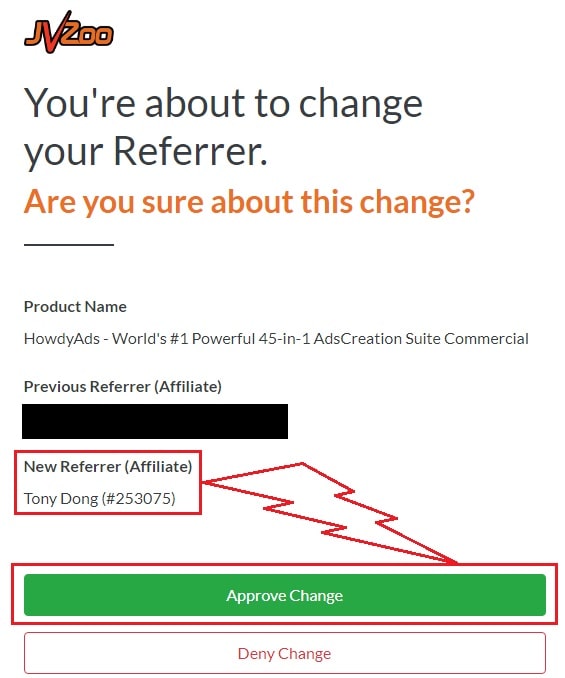
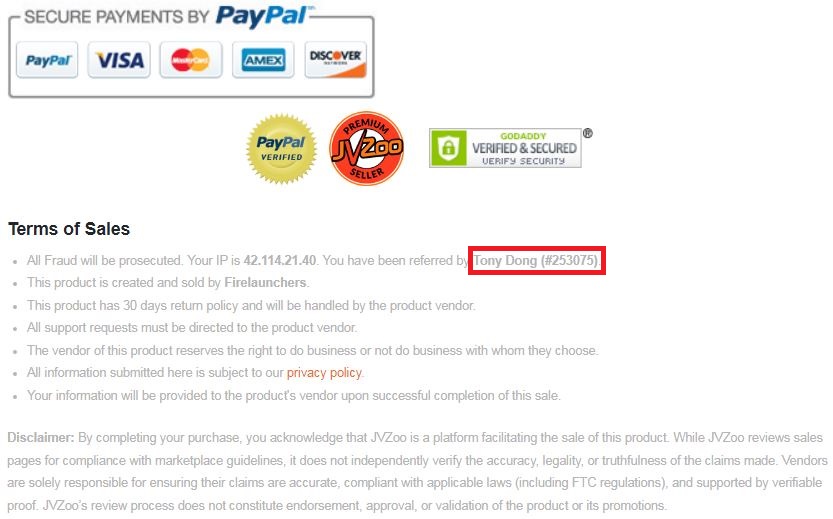
You need to choose Tony Dong (253075) as your Referrer.
- If you see Tony Dong as your “New Referrer”, click the Green “Approve Change” button.
- If you see Tony Dong as your “Previous Referrer“, click the Grey “Deny Change” button.
It’s very important to confirm that my affiliate ID is 253075.
Almost bonuses, I will add them to the purchase portal when you finish your transaction through my ID. If you don’t see it, please follow the instructions below
Confirm On The Checkout Page With My ID
☞ STEPS TO GET YOUR BONUSES☜
Please follow all the Important Steps Below to Claim All These Bonuses
(EXTRA BONUS + BONUS PACKAGE 1&2&3&4 + SPECIAL BONUS)
- Step#1: Press (Ctrl+Shift+Delete) or Clean/Delete the Cookies and cache of your web browser. (Please Clear It Before clicking on the Buy Button on the Sale page)
- Step#2: Get TwinClips AI via any link in this article TwinClips AI Review or Click here
- Step#3: Confirm my ID is Tony Dong: 253075 on the checkout page, and after completing the transaction, Send Me Your ID Transaction for Verification Through My Support Email at support@reviewproductbonus.com and marketingwithtony@gmail.com
- Step#4: Use the subject line “CLAIM BONUS TWINCLIPS AI” in your email and wait
You will receive these Bonuses within the NEXT 20 hours.
Thank you for reading my TwinClips AI Review
Affiliate disclosure: This page contains affiliate links. If you buy through them, I may earn a commission at no extra cost to you. It doesn’t change my opinion of the product.