Affiliate disclosure: This page contains affiliate links. If you buy through them, I may earn a commission at no extra cost to you. It doesn’t change my opinion of the product.
If you’ve been searching for an honest ViralForge review, you’re probably wondering the same thing most people ask about AI video tools: will this help me get views, or is it another app I’ll log into twice and forget?
ViralForge is a new AI video app by Abhi Dwivedi’s team that takes a video already going viral and rebuilds it into up to 25 new videos built around your affiliate offer. It then schedules them to TikTok, Instagram and YouTube. Below I break down how it works, what you get at each price, where it falls short, and who should skip it.
ViralForge Review Summary
Here is the short version if you’re in a hurry.
- Product: ViralForge
- Creator: Abhi Dwivedi and team (the sales page says they’ve been the top JVZoo vendor for seven years running)
- What it does: Finds a viral video, breaks down why it worked, and remakes it as up to 25 original videos with your link
- Platforms: TikTok, Instagram and YouTube
- Price: $37 one-time for founding members, then $97 a year after launch
- Included: 100 videos, no API keys, no extra AI bills
- Refund: 14 days
- Best for: Beginners, affiliates and side-hustlers who don’t want to be on camera
- My rating: 8/10 for the idea and the price, with some caveats covered below

Get Access ViralForge xBundle Deal Today

What Is ViralForge?
ViralForge is a web-based AI video tool built around one idea: don’t start from a blank page, start from a video that already won.
Most AI video apps hand you an empty prompt box and leave you to guess what to make. ViralForge works the other way around. You pick a video that’s climbing fast in your niche, or paste a link to one you spotted. The app studies the hook, the structure, the pace and the caption style, keeps that formula, and replaces everything else with a new script, a new AI presenter and your own offer.
The original footage never appears in your video. It copies the format, not the video. That’s the difference between this and a repost page, and it matters a lot given how much social platforms now push original content.
The money method is simple. A stranger watches your video, taps your profile, clicks the link in your bio and buys. The commission goes to your affiliate account, such as JVZoo, ClickBank or WarriorPlus. You don’t need an email list, a following or a product of your own.
How ViralForge Works
The whole process runs in six steps, and each one is roughly a click.
Step 1: Find a winner with TrendRadar
You choose a niche, and TrendRadar ranks the videos and ads gaining momentum in it, using sources like TikTok Creative Center and the Meta Ad Library. Or you paste any TikTok, Reel, Short or ad link yourself.
Step 2: Decode why it worked
DNA Decoder breaks the video into its hook, structure, pace and caption style. One screen shows what the AI will keep and what it will change, and you can switch items before moving on.
Step 3: Make it yours
SwapEngine rewrites the video around your niche and link. You choose a presenter, a voice and a language. Before anything renders, a Claims and Trademark check flags risky wording and brand names, and offers a safer version.
Step 4: Multiply it
You pick how many versions you want, up to 25, and click once. FreshHooks gives each one its own opening, caption, hashtags, on-screen text and framing. The batch renders in the background, and you get an email when it’s done.
Step 5: Schedule everything
The Smart Scheduler drips the videos out to TikTok, Instagram and YouTube, three a day by default, with the AI label set on each post. You can also download any video as an MP4 and post it somewhere else, like Facebook.
Step 6: Get paid and clone the winner
Every video points to your bio-link page, where your offers sit. Analytics shows which hook pulled the most views and clicks. Hit “Clone Again” and the winner becomes your next batch.
One practical tip from the product materials: a brand-new Instagram account can add a bio link on day one, while TikTok unlocks the bio link as the account grows. So Instagram Reels is the easiest place to start.
ViralForge Features Worth Knowing About
TrendRadar and the Paste-a-Link option
Knowing what to post is the part most beginners get stuck on. TrendRadar shows what’s rising this week compared with last month, so you can catch a format while it’s still climbing. There are also Starter Templates, so your first batch doesn’t depend on research.
SwapEngine and the Offer Library
“What do I promote?” stops a lot of newcomers. The Offer Library lets you search offers across JVZoo, ClickBank and WarriorPlus inside the app and drops your affiliate link straight into the batch. You can also use your own product link.
FreshHooks and multiple formats
Posting the same video 25 times is pointless. FreshHooks gives each version a different opening, and the app checks versions against each other so no two come out alike. You can render in 9:16, 1:1 or 16:9, and remake a winner in another language with a fully new voice and captions, not just subtitles.
AI presenters and voices
You never have to show your face or record your voice. There are multiple presenters and voices to choose from, and you can set a favorite as your default.
Bio-link page, analytics and saved formats
The link-in-bio page is built in. Analytics tracks views, watch-through and clicks per video. Every format you decode gets saved to your library so you can rerun it later with a new offer or presenter. The whole flow also works in a phone browser.
ViralForge Has No API Keys and No AI Bills. Does That Hold Up?
This is the biggest selling point, so it deserves a closer look.
Many AI video apps sold as cheap one-time purchases ask for your own API key and bill you for every video you generate. The sales page calls this the “API Key Trap.” ViralForge says it covers every AI cost: presenters, voices, B-roll and scripts. Your 100 videos are paid for upfront.
Is that believable at $37? The team gives two reasons. First, it renders one base video and re-renders only the parts that change per version, so versions 2 through 25 cost much less than the first. Second, this is a founding member launch, and they’d rather have users and feedback than charge for credits.
That’s a reasonable explanation, but it’s also why the price won’t last. After launch it moves to $97 a year. And the cap is real: once you’ve used 100 videos, you’ll need the Unlimited upgrade to keep going. They say you’ll see that option after checkout, not as a surprise charge.
At 100 videos for $37, you’re paying about 37 cents a video. For comparison, the sales page lists one UGC creator marketplace averaging $154 per video job, and AI video subscriptions like HeyGen Pro at $49 a month and Synthesia Pro at $89 a month (prices as shown on the vendor’s page, checked October 2026).
ViralForge Pricing and Upgrade Options
There are three levels. Prices below are the founding member prices from the sales page, so check the current numbers before you buy.
ViralForge front end: $37 one time
You get the full core toolset: TrendRadar, DNA Decoder, SwapEngine, FreshHooks, the Offer Library, AI presenters and voices, the Smart Scheduler, the bio-link page and Analytics. The limits are 100 videos total and batches of up to 25. After launch it becomes $97 a year.
ViralForge Bundle: $267 a year with coupon VBUNDLE50
This removes the main limits. It adds Unlimited (no 100-video cap, fair use applies, batches of 100 and AutoPost), the Vault of pre-decoded viral blueprints, Ultra (sharper presenters, voices and B-roll with priority renders), Agency (white-label dashboard, client logins and reseller rights), plus two more apps, ContentReel26 and ViralReelAI. The founding price is locked for as long as you stay. After launch the Bundle is listed at $997 a year.
ViralForge Bundle Platinum: $417 a year with coupon VPLATINUM50
Everything in the Bundle, plus three live training calls with the founders, a review of your first batch by their team, extra apps (four with agency rights), HighSpeed Multi-Batch, the AIClubHub private group and two VIP agency trainings. This tier is launch only.
My take: start with the $37 front end. You’ll know within your first couple of batches whether the workflow suits you, and the 14-day guarantee covers you if it doesn’t. If you already know you’ll post daily and want no cap, the Bundle makes sense. Platinum is mainly for people who want hand-holding.
ViralForge Bonuses
Founding members who buy during the launch get $919 in bonuses:
- RedCarpet LIVE Training: a live walkthrough of your first 25 videos (valued at $497)
- The 100 Viral Hooks Swipe File
- The Top 50 Offers List (JVZoo, ClickBank and WarriorPlus offers suited to short video)
- The 30-Day Posting Plan
- The Bio-Link Click Playbook
- The New Account Setup Checklist
- The Black Friday Video Playbook
The live training is the most useful of these, since the usual failure with new tools is never getting past the first setup. The offers list and the posting plan are also handy if you’re starting from zero.
ViralForge Pros and Cons
What I like
- It starts from proof, not guesswork. Building on formats that already earned views removes the hardest part for beginners.
- No API keys or usage meter. You know what you’re paying.
- It covers the whole chain: find, remake, schedule, link, track.
- No camera, voice or editing needed.
- The Claims and Trademark check and automatic AI labels show the team thought about account safety.
- The $37 price is low for what’s included, and there’s a 14-day guarantee.
- It works from a phone browser.
What to watch out for
- The 100-video cap. At three posts a day, that’s about a month of content. After that you’d need the Unlimited upgrade.
- There are many upsells. The upgrade stack is long, and most people don’t need all of it.
- The commission screenshots on the sales page come from the vendor’s affiliate students, who, per the page itself, did not use ViralForge. Treat them as proof of the vendor’s teaching, not of this app’s results.
- Earnings aren’t guaranteed. The press stories on the page (a $8,600 a month TikTok affiliate, for example) are about creators who weren’t using ViralForge either.
- AI-generated video is under more scrutiny. The sales page mentions YouTube removing “AI slop” channels in January 2026. Low-effort, generic AI content is a risk on any platform.
- TikTok’s bio link unlocks only as an account grows, so TikTok will be slower to monetize than Instagram.
- It’s a new product, so there’s no long track record yet.
Who Should Buy ViralForge?
ViralForge is a good fit if:
- You want to try affiliate marketing without an email list or an existing audience
- You don’t want to be on camera or record your own voice
- You’ve got a day job and about an hour a night
- You’ve bought AI tools that billed you per video and want predictable costs
- You’re willing to spend around 20 minutes setting up your first batch
It’s probably not for you if:
- You plan to repost other people’s videos and hope nobody notices
- You expect income without posting anything
- You want to make videos for clients on the cheap (that requires the Agency upgrade)
Is ViralForge Legit or a Scam?
Based on everything in the vendor’s materials, ViralForge looks like a real product from an established JVZoo vendor, sold through JVZoo’s checkout with a 14-day refund policy. Nothing on the page reads like a scam.
That said, “legit” doesn’t mean “guaranteed to make money.” The tool produces and posts videos. Whether those videos earn commissions depends on your niche, your offers, and how consistently you post. Anyone promising a fixed income from any tool like this should be treated with caution, and the vendor’s own disclaimers say the same.
ViralForge vs Other AI Video Tools
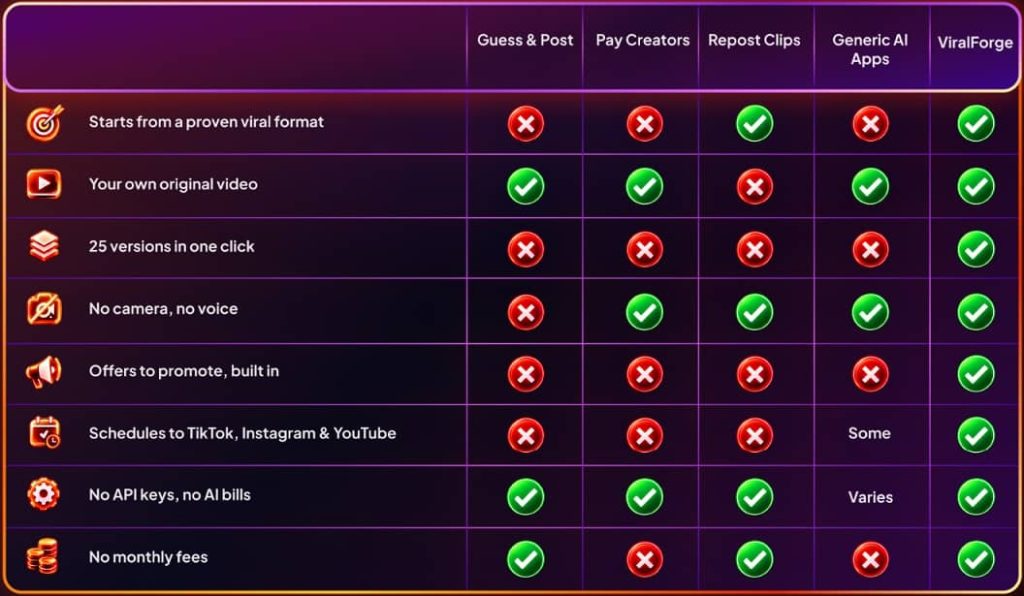
HeyGen, Synthesia, Captions, Creatify and MakeUGC are all solid avatar and video tools, but they work differently. They give you a blank canvas and charge a monthly fee, listed on the vendor’s page at $49 to $99 a month. They also don’t tell you what to make, decode trending formats, hand you offers to promote, or post for you.
ChatGPT can write a script and CapCut can edit a video, but neither finds what’s trending in your niche, renders AI presenters, or schedules posts across platforms. ViralForge’s edge is that it bundles all of those steps in one place, at a much lower entry price.
ViralForge Refund Policy
You get a 14-day First-Batch Guarantee. Make your first batch, schedule it, join the live training, and if you decide it isn’t for you for any reason, open a support ticket within 14 days for a full refund. Bundle and Platinum are covered by the same guarantee.
Final Verdict: Is ViralForge Worth It?
For the $37 founding price, yes, it’s worth trying, as long as you set realistic expectations.
The idea is sound. Short video is where attention is, and remaking a proven format is how many creators broke out. ViralForge makes that process fast and cheap, and the no-API-key model removes the usual hidden cost. The 14-day guarantee keeps the risk low.
Just remember what it is: a video production and posting tool, not an income button. Pick a niche you can stay in, post consistently, test the 25 hooks, and clone what works. If you do that, it gives you a real chance at traffic you’d otherwise pay a lot to produce.
The founding price and bonuses are tied to the launch period, so if you’re interested, it’s smart to check the current offer before it changes.
Get ViralForge at the founding member price here
Going for the Bundle or Platinum? Use coupon VBUNDLE50 or VPLATINUM50 at checkout.
ViralForge Review FAQ
What is ViralForge?
ViralForge is an AI video app that takes a video already going viral and remakes it into up to 25 original versions with a new script, AI presenter, voice and your affiliate link, then schedules them to TikTok, Instagram and YouTube.
How much does ViralForge cost?
Founding members pay $37 one time, which includes 100 videos. After launch it moves to $97 a year. The Bundle is $267 a year with coupon VBUNDLE50 and Bundle Platinum is $417 a year with coupon VPLATINUM50.
Do I need an API key for ViralForge?
No. ViralForge covers the AI costs for presenters, voices, scripts and B-roll, so there are no API keys, credits or usage bills.
Do I need followers or an email list?
No. The product is built for new accounts. TikTok, Instagram and YouTube all show new videos to people who don’t follow you.
Is ViralForge just reposting other people’s videos?
No. It copies the format, not the footage. The original video never appears in your version.
Do I have to show my face?
No. You use AI presenters and AI voices instead.
How many videos can I make?
The front end includes 100 videos in batches of up to 25. The Bundle and Platinum add Unlimited, with no 100-video cap (fair use applies) and batches of 100.
How do I get paid with ViralForge?
Your videos send viewers to your bio-link page. When someone buys through your affiliate link, the affiliate network, such as JVZoo, ClickBank or WarriorPlus, pays you the commission. ViralForge supplies the videos and the link page, not the commissions.
Does ViralForge work on a phone?
Yes. The whole flow works in a phone browser.
Is there a refund?
Yes. The 14-day First-Batch Guarantee gives you a full refund if you open a support ticket within 14 days.
Is ViralForge safe for my accounts?
Every video is an original version, every post carries the AI label the platforms ask for, and a claims and trademark check catches risky wording before rendering. No tool can promise a platform will never flag an account, so still follow each platform’s rules.
Income disclaimer: Results vary by effort, niche and offers. Nothing on this page guarantees earnings.
Get Access TokMax AI Early Bird Today

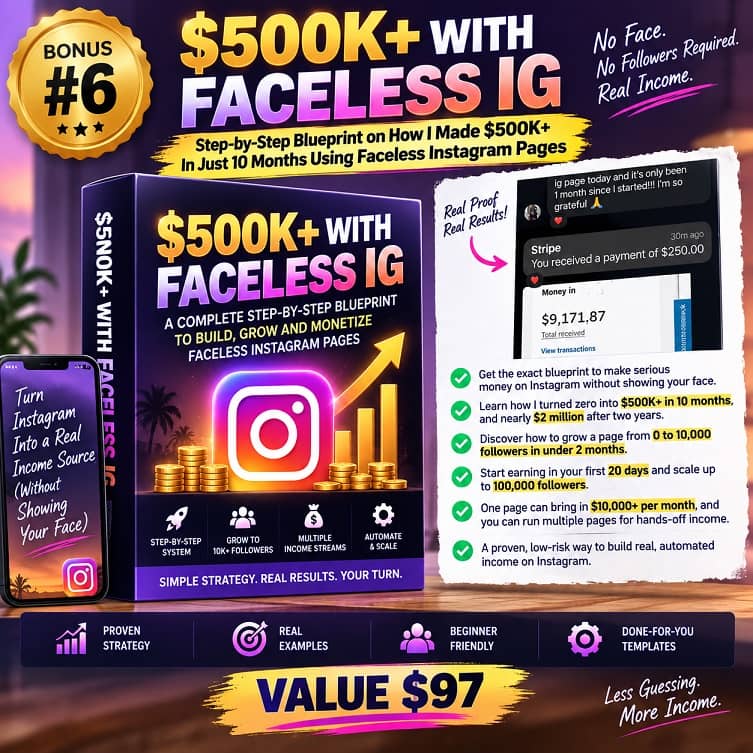
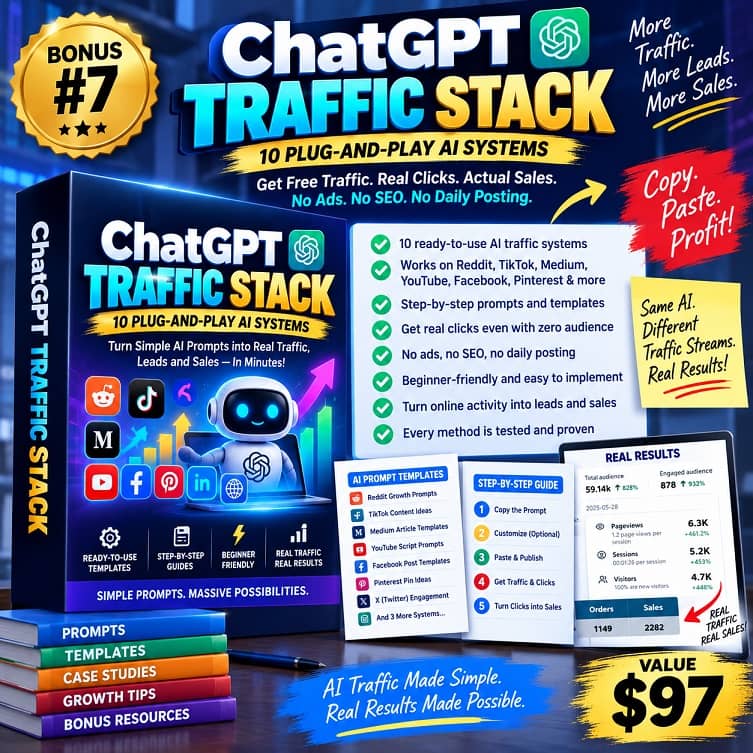
THESE ARE TOKMAX AI BONUSES WHEN YOU BUY IT VIA MY LINK TODAY
PLUS THESE EXCLUSIVE BONUSES








♨️ Important Update For Getting My Bonuses ♨️
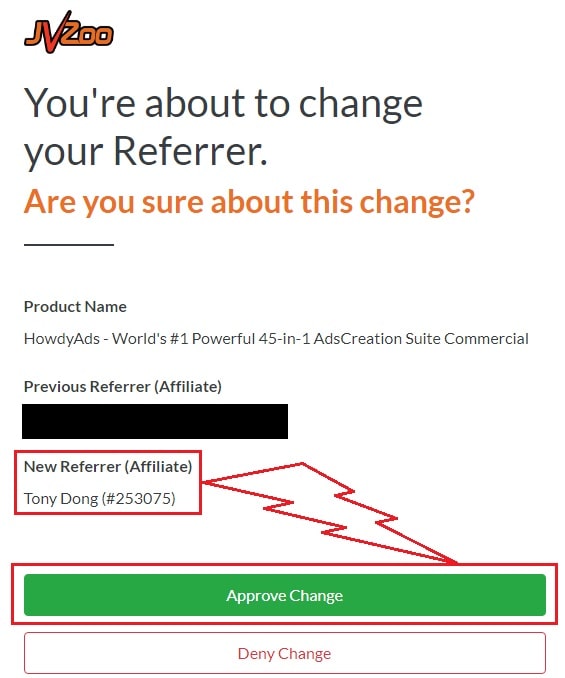
You need to choose Tony Dong (253075) as your Referrer.
- If you see Tony Dong as your “New Referrer”, click the Green “Approve Change” button.
- If you see Tony Dong as your “Previous Referrer“, click the Grey “Deny Change” button.
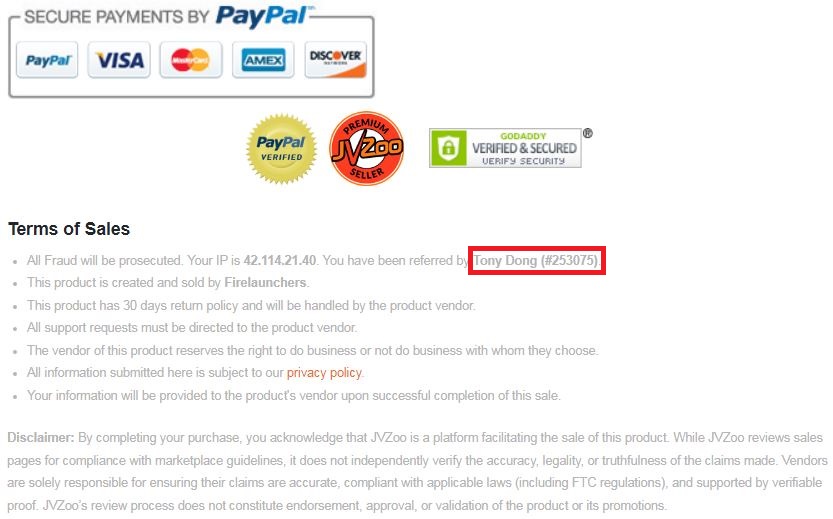
It’s very important to confirm that my affiliate ID is 253075.
Almost bonuses, I will add them to the purchase portal when you finish your transaction through my ID. If you don’t see it, please follow the instructions below
Confirm On The Checkout Page With My ID
☞ STEPS TO GET YOUR BONUSES☜
Please follow all the Important Steps Below to Claim All These Bonuses
(EXTRA BONUS + BONUS PACKAGE 1&2&3&4 + SPECIAL BONUS)
- Step#1: Press (Ctrl+Shift+Delete) or Clean/Delete the Cookies and cache of your web browser. (Please Clear It Before clicking on the Buy Button on the Sale page)
- Step#2: Get ViralForge via any link in this article ViralForge AI Review or Click here
- Step#3: Confirm my ID is Tony Dong: 253075 on the checkout page, and after completing the transaction, Send Me Your ID Transaction for Verification Through My Support Email at support@reviewproductbonus.com and marketingwithtony@gmail.com
- Step#4: Use the subject line “CLAIM BONUS VIRALFORGE” in your email and wait
You will receive these Bonuses within the NEXT 20 hours.
Thank you for reading my ViralForge Review
Wish You Success and See You Again
Disclosure: This post contains affiliate links. If you buy through them, I may earn a commission at no extra cost to you. This review reflects the product information available at the time of writing, and results will vary.