CueVue Review 2026: Is This LiveRep AI Worth $147?

Honest CueVue review: how the LivePresence LiveRep works, real pricing breakdown, pros and cons, and whether the $147 All Access Bundle is worth it.
Product Brand: CueVue
Product Currency: USD
Product Price: 147
Product In-Stock: InStock
4.8
I’ve tested a lot of AI website tools that promise to “engage visitors” and most of them turn out to be a chat widget with a new coat of paint. CueVue is different enough that it earned its own review, so here’s what it actually is, how it works, what you get for your money, and where I think it falls short.
If you’re searching “CueVue review” because you saw Todd Gross talking about it on a webinar or in your inbox, this article covers everything you need before you buy — no fluff, no hype, just what the product does and who it’s actually good for.

What Is CueVue?
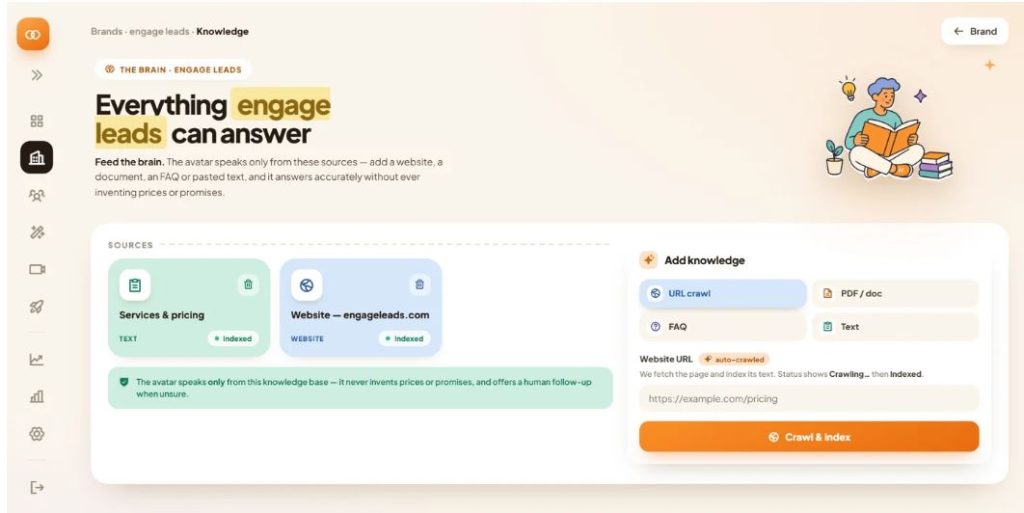
CueVue is a website tool built around something the creators call LivePresence — basically a lifelike, on-screen “LiveRep” that visitors can talk to in real time, the same way they’d talk to a person standing at a front desk. You paste in your website URL, CueVue reads the site and turns it into a knowledge base, you pick a face and voice, and within a few minutes you have a rep sitting on your site who can answer questions, qualify leads, book appointments, or hand a visitor off to your team.
The people behind it are Todd Gross and Prady, and the pitch is simple: your website is a monologue, not a conversation. A visitor lands, reads, maybe scrolls, and if nothing answers the specific question in their head, they leave. CueVue’s argument is that a real two-way conversation — not a script, not a chatbot flow — closes that gap.
How CueVue Actually Works
The setup is genuinely short, and that’s one of the more believable claims in the whole pitch since the process is simple enough to sit through yourself.
Step 1: Paste Your Website URL
No documents, no PDFs to upload, no developer needed. You give CueVue one web address.
Step 2: CueVue Reads Your Business
In roughly 10 to 30 seconds, it pulls your services, offers, locations, and tone into an editable knowledge base. You can go in and correct anything line by line before it goes live, which matters a lot — more on that below.
Step 3: Pick a LiveRep
You choose a face and voice from the stock library (there are dozens of options depending on the tier you buy), and assign it one job — book a consult, capture a lead, answer support questions, whatever fits your funnel.
Step 4: Drop In One Line of Code
The rep goes live on your site. CueVue claims the whole process from URL to working rep takes about three minutes, and based on how the setup screens are laid out, that’s a fair estimate for a simple use case.
Watch CueVue Demo Video
The Core Idea: Listens, Responds, Acts
This is the part of the CueVue pitch that separates it from a chatbot, and it’s worth understanding because it’s the actual value proposition.
It Listens
Visitors talk or type, and the rep processes what they’re actually asking rather than matching against a list of keywords. That’s a real two-way voice conversation, not a script running on a loop.
It Responds
Answers come strictly from your approved business knowledge, delivered through the lifelike face and voice, in over 70 languages with automatic detection. It’s not improvising outside what you fed it.
It Acts
This is the piece most talking-avatar tools skip entirely. CueVue captures the lead, books the appointment, routes the request, and pushes the outcome straight into tools you’re already using — your CRM, email platform, Google Sheets, or a Zapier flow.
The comparison the creators draw is: chatbots type, avatars perform, LiveReps work. It’s obviously a marketing line, but it’s also a fair summary of the actual gap between CueVue and the avatar tools that came before it — most of those really were just talking-head video players with a script.
Where You Can Put a LiveRep
CueVue isn’t limited to a corner bubble on your homepage. You get ten placement options across the customer journey:
- Pre-sale pages, to answer the question holding up a purchase
- Checkout, to handle last-second hesitation
- Appointment pages, to qualify and book while intent is high
- Support pages, answering from your knowledge base
- Follow-up touchpoints — email, SMS, and QR codes that open straight into a conversation
You also choose the display style — corner bubble, side drawer, or full-page takeover — and set what outcome each placement is working toward (lead capture, booking, testimonial collection, support, and so on).
Done-For-You Templates
One thing that stood out to me is the 30 Done-For-You conversation templates included with the All Access tier. Each one comes with the prompt already written, capture fields already mapped, and a recommended place to deploy it. They’re split across eight business goals: leads, appointments, selling, onboarding, reviews, support, recruiting, and surveys.
For anyone who isn’t going to sit down and write a conversation flow from scratch, this is genuinely the difference between using the product in an afternoon versus staring at a blank knowledge base wondering where to start.
What You Get After a Conversation Ends
This is the part that gets glossed over in most reviews, but it’s arguably the most useful feature for actually running a business with this thing. After every conversation, CueVue gives you:
- A full recording and transcript
- Whether the lead is hot or cold
- What the visitor wanted and asked
- What objections came up
- What they agreed to
- A suggested next step
That whole package rolls up into what CueVue calls a lead dossier — score, temperature, captured fields, and the delivery log showing where the data was sent. If you’re running this for a client, that’s the report you hand over without touching a spreadsheet.
CueVue Pricing: What’s In the All Access Bundle
Here’s the part people actually search for, so let’s get specific. During the launch, CueVue is only being sold as the All Access Bundle — there’s no stripped-down front-end version.
All Access Bundle — $147 one-time (listed value $455)
- CueVue Commercial ($37 value) — full LiveRep builder, 10 stock faces, up to 3 simultaneous live conversations, 41 agent templates, all core placements, 6 lead destinations, recordings and analytics, commercial license
- 30 Done-For-You Templates ($47 value) — pre-built knowledge, persona, tone and objection handling across seven niches
- Go Global + Follow-Up ($97 value) — 70+ languages with automatic detection, translated captions, and outcome-triggered email/SMS follow-up sequences
- CueVue Agency ($197 value) — 10 client workspaces, white-labeled dashboard, separate credit pools and data per client
- 1,000 CueVue Credits ($77 value) — 1,000 minutes of live animated conversation
- Gemini access free for 45 days or 100 minutes (launch bonus only)
It’s a one-time payment, not a subscription, and it comes with a 14-day money-back guarantee.
Optional Upgrades You’ll See at Checkout
- Order bump: 5 additional custom avatars for $77
- Mega Bundle ($297 one-time): premium avatar engine, premium voice library, voice cloning, two custom avatars, up to 5 simultaneous conversations, branding removed, 2,000 extra minutes, plus the full Agency Launch Kit (agency website, niche one-pagers, outreach sequences, ad creative, client decks, delivery SOPs)
- Mega Bundle Lite ($147 one-time): the same Mega Bundle contents minus the masterclass call, with 1,000 fewer credits
If you’re only running this for your own site, the base All Access Bundle covers everything you need. The Mega Bundle only makes sense if you’re planning to resell CueVue setups to clients or want unlimited creative control over the avatar itself.
CueVue vs. Chatbots vs. Talking Avatars
| Chatbot | Talking Avatar | CueVue LiveRep | |
|---|---|---|---|
| Interaction | Typing | Watch & listen | Talk naturally, real back-and-forth |
| Knowledge source | Connected workflows | Pre-written script | Your approved business knowledge |
| What it does | Depends on setup | Mostly presents | Captures, qualifies, books, acts |
| What you learn | Chat logs | Views/engagement | Recording, transcript, scoring, dossier |
| Setup | Configure bots/flows | Write scripts | Paste a URL, done in minutes |
This table is really the whole sales pitch condensed, and having gone through the setup myself, it holds up — the meaningful difference isn’t the face on screen, it’s that the rep takes an action afterward instead of just delivering a message.
What I Like About CueVue
- Setup is genuinely fast — pasting a URL and getting a working rep in a few minutes isn’t an exaggeration
- The knowledge base is editable line by line, so the rep isn’t guessing or hallucinating answers about your business
- The “acts” piece is real — leads and bookings flow into tools you already use instead of sitting in a dashboard nobody checks
- 30 Done-For-You templates remove the blank-page problem for non-technical users
- One-time pricing with no subscription, plus a 14-day refund window
Where CueVue Falls Short
- The case study numbers used in the sales material (2X meetings, +250% leads) come from other conversational AI platforms — Vanilla, Demandbase, Evocalize, Greenhouse — not from CueVue customers. That’s disclosed in the fine print, but it’s easy to miss on a first read and worth knowing going in.
- Only 3 simultaneous live animated conversations on the base Commercial tier — a busy site could hit that ceiling and fall back to audio/chat mode
- Agency-level features (white-labeling, client workspaces) are locked behind the higher tiers, so solo business owners are paying for capacity they won’t use
- Like any AI tool that reads your site automatically, the first knowledge-base pass will need a manual review before it goes live — skipping that step is how you end up with a rep giving a visitor outdated pricing
Who Should Actually Buy CueVue
This tool makes the most sense for:
- Service businesses (contractors, clinics, agencies) that get repetitive pre-sale questions a rep could answer instead of a human
- Marketing agencies who want a tangible demo to show a prospect before they’ve even signed — building a LiveRep from a prospect’s own site and sending it to them cold is one of the smarter uses of this product
- Ecommerce stores that lose sales at the point of hesitation right before checkout
- Course creators and coaches who need a support/onboarding layer without hiring someone
If your site gets almost no traffic, or your business model doesn’t really involve pre-sale questions, the ROI here is going to be thin no matter how good the tech is.
Final Verdict
CueVue isn’t reinventing conversational AI, but it’s doing something most tools in this space skip: closing the loop between a conversation and an actual outcome. The setup speed is real, the editable knowledge base keeps the rep from making things up, and the lead dossier is the kind of reporting that actually gets used instead of ignored.
At $147 one-time with a 14-day guarantee, the risk is low enough that testing it on one site or one client is a reasonable call. If you’re leaning agency, the Mega Bundle’s Launch Kit is worth a look — otherwise the base All Access Bundle covers what most single-site owners need.
Frequently Asked Questions
Is CueVue a talking video or a real conversation?
It’s a real two-way conversation. The rep isn’t playing a prerecorded clip — it processes what the visitor says and responds using the approved knowledge base in real time.
Does CueVue work in languages other than English?
Yes. It automatically detects the visitor’s language and responds in it, with support for over 70 languages under the Go Global upgrade included in the All Access Bundle.
Will CueVue make things up about my business?
It’s built to stay inside the knowledge you give it. When a question falls outside that knowledge, the rep says so and routes the visitor to a human instead of guessing.
Do I need a developer to install it?
No. Installation is a single line of embed code that works across WordPress, Shopify, Webflow, Squarespace, and custom sites.
Can I use CueVue for clients as an agency?
Yes, the All Access Bundle includes 10 separate client workspaces with individual credit pools and white-labeled reporting.
Is there a refund if it doesn’t work for my business?
Yes, CueVue comes with a 14-day money-back guarantee.
Get Access CueVue Early Bird Discount Now

Get Access CueVue All Access Bundle Deal Today










These are Bonuses for CueVue OTO When You Buy More OTO/Upsell
Choose 10 Custom Special Bonuses for CueVue OTO

♨️ Important Update For Getting My Bonuses ♨️
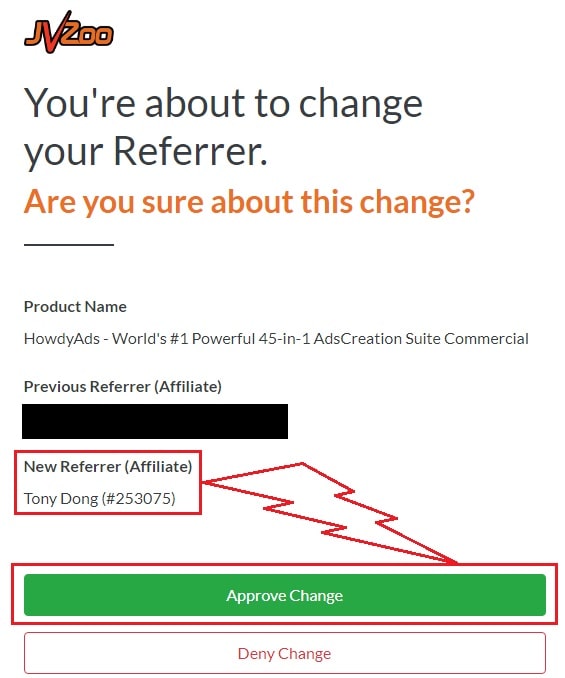
You need to choose Tony Dong (253075) as your Referrer.
- If you see Tony Dong as your “New Referrer”, click the Green “Approve Change” button.
- If you see Tony Dong as your “Previous Referrer“, click the Grey “Deny Change” button.
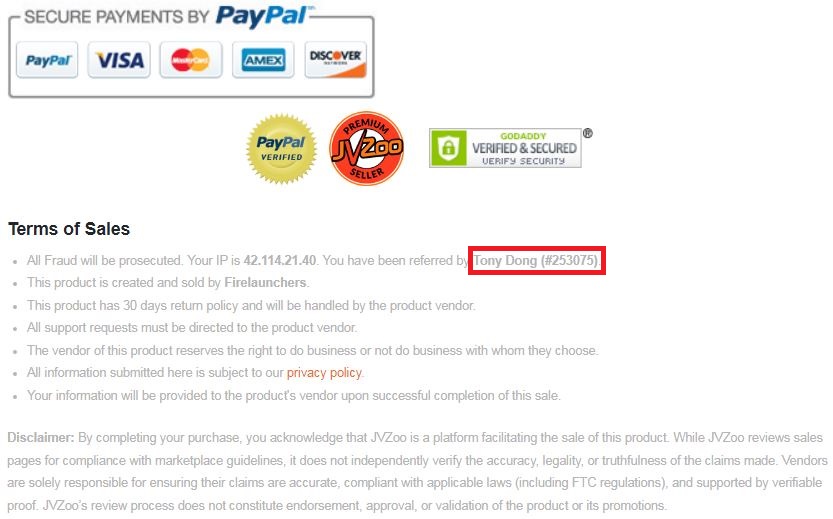
It’s very important to confirm that my affiliate ID is 253075.
Almost bonuses, I will add them to the purchase portal when you finish your transaction through my ID. If you don’t see it, please follow the instructions below
Confirm On The Checkout Page With My ID
☞ STEPS TO GET YOUR BONUSES☜
Please follow all the Important Steps Below to Claim All These Bonuses
(EXTRA BONUS + BONUS PACKAGE 1&2&3&4 + SPECIAL BONUS)
- Step#1: Press (Ctrl+Shift+Delete) or Clean/Delete the Cookies and cache of your web browser. (Please Clear It Before clicking on the Buy Button on the Sale page)
- Step#2: Get LiveStreamSalesAgents AI via any link in this article LiveStreamSalesAgents AI Review or Click here
- Step#3: Confirm my ID is Tony Dong: 253075 on the checkout page, and after completing the transaction, Send Me Your ID Transaction for Verification Through My Support Email at support@reviewproductbonus.com and marketingwithtony@gmail.com
- Step#4: Use the subject line “CLAIM BONUS CUEVUE” in your email and wait
You will receive these Bonuses within the NEXT 20 hours.
Thank you for reading my CueVue Review
Wishing You Success and See You Again
Disclosure: This review may contain an affiliate link. If you purchase CueVue through a link on this page, I may earn a commission at no extra cost to you.